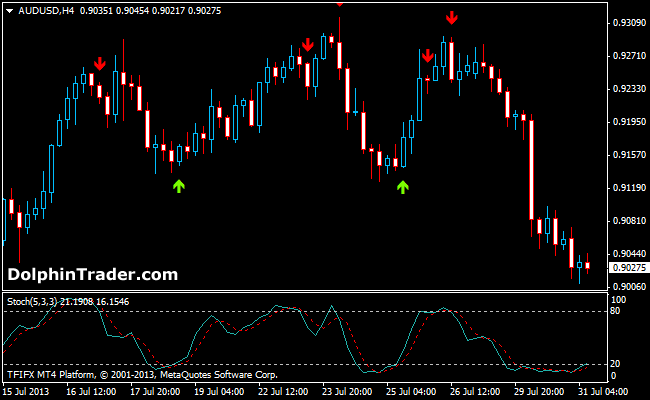
The Stochastic Cross Alert indicator for MT4 draws a buy arrow on the chart when the indicator lines cross each other from below 20 back above (oversold readings).
Similarly, a red sell arrow appears on the chart when the lines cross each other from above 80 back below (overbought readings).
General Assumptions
80+ readings: overbought
20- readings: oversold
Trading Signals
The Stochastic Alert indicator works great in a trend less (flat) environment but will fail in a trending market.
Therefore, first identify the overall trend and take the appropriate signals in the direction of the prevailing trend.
For example, in a bullish trend, only pay attention to the green oversold signals.
Download
Download the Stochastic Cross Alert.mq4 indicator.
Configurable Indicator Options
KPeriod, DPeriod, MA_Method, SoundON, EmailON
AUD/USD 4 Hour Chart Example
How to install the Stochastic Cross Alert custom indicator in Metatrader 4?
- Download the Stochastic Cross Alert.mq4 indicator to your computer.
- Open your Metatrader 4 platform.
- Open the data folder from the top menu.
- Open the MQL4 folder.
- Open the indicators folder.
- Paste the indicator file in this folder.
- Restart the trading platform.
- Open any trading chart.
- Attach the indicator to the chart.