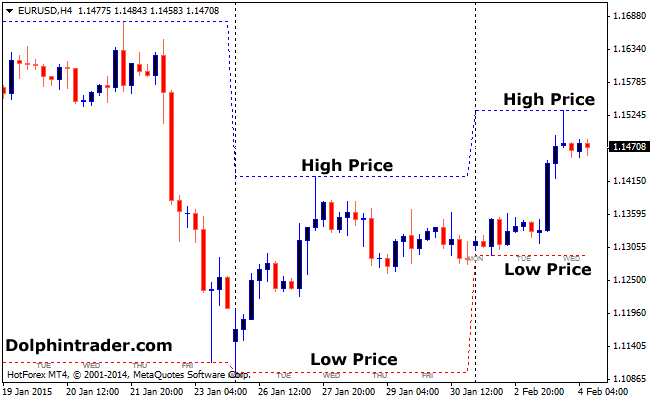
The Higher Time frame Price indicator for MT4 shows the high-low price for your selected time frame (select at the Inputs box).
For example, choose the weekly time frame when looking at the 4 hour charts.
Choose daily time frame when looking at the 30 min and 1 hour charts.
Select the hourly time frame from anything below the 30 min charts.
Trading Signals
No signals from this Forex indicator.
Indicator Preferences
Currency pairs: any
Preferred Time frames: any
Sessions: any
Download
Download the highlowprice.mq4 indicator.
Configurable Indicator Options
Higher Timeframe, Use Auto Shift, Color,…
How to install the Higher Time frame custom indicator in Metatrader 4?
- Download the highlowprice.mq4 indicator to your computer.
- Open your Metatrader 4 platform.
- Open the data folder from the top menu.
- Open the MQL4 folder.
- Open the indicators folder.
- Paste the indicator file in this folder.
- Restart the trading platform.
- Open any trading chart.
- Attach the indicator to the chart.