The DPO oscillator for Metatrader 4 delivers great signals for scalpers and day traders alike.
Key Assumptions
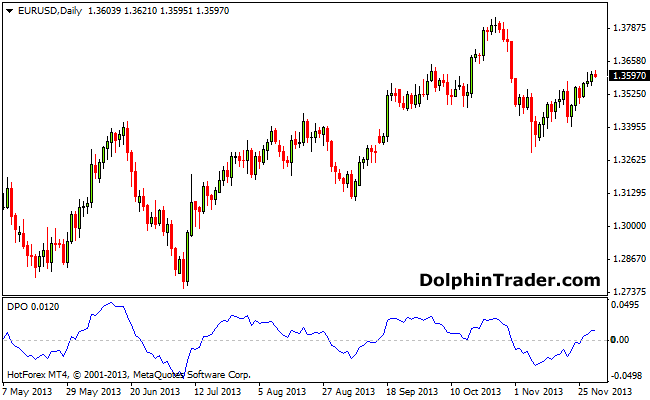
Bullish: The trend is considered bullish when the DPO oscillator crosses the zero level bottom-up.
Bearish: The trend is considered bearish when the DPO oscillator crosses the zero level top-down.
Trading Signals
BUY: Wait for oversold indicator values in uptrending markets.
SELL: Wait for overbought indicator values in downtrend markets.
Use in conjunction with trend following indicators or trading patterns.
Download
Download the DPO.mq4 Metatrader 4 indicator.
Configurable Indicator Options
x_prd, CountBars
EUR/USD Daily Chart Example
How to install the DPO Oscillator custom indicator in Metatrader 4?
- Download the DPO.mq4 indicator to your computer.
- Open your Metatrader 4 platform.
- Open the data folder from the top menu.
- Open the MQL4 folder.
- Open the indicators folder.
- Paste the indicator file in this folder.
- Restart the trading platform.
- Open any trading chart.
- Attach the indicator to the chart.